

安装说明
1.在游戏主菜单界面,用 DLL注入器 注入(Process Hacker 2、Cheat Engine 等)。
2.注入后会自动加载你已保存的设置。
热键
INSERT —— 开关菜单(可在 Misc 标签页重新绑定)
END —— 卸载(可在 Misc 标签页重新绑定)
穿墙(No-Clip)键 —— 默认 SPACE(可在 Player 标签页重新绑定)
开关 Ghost ESP、开关 Tools ESP、开关雷达 —— 在 Misc 标签页自行设置按键
功能翻译
视觉(ESP)
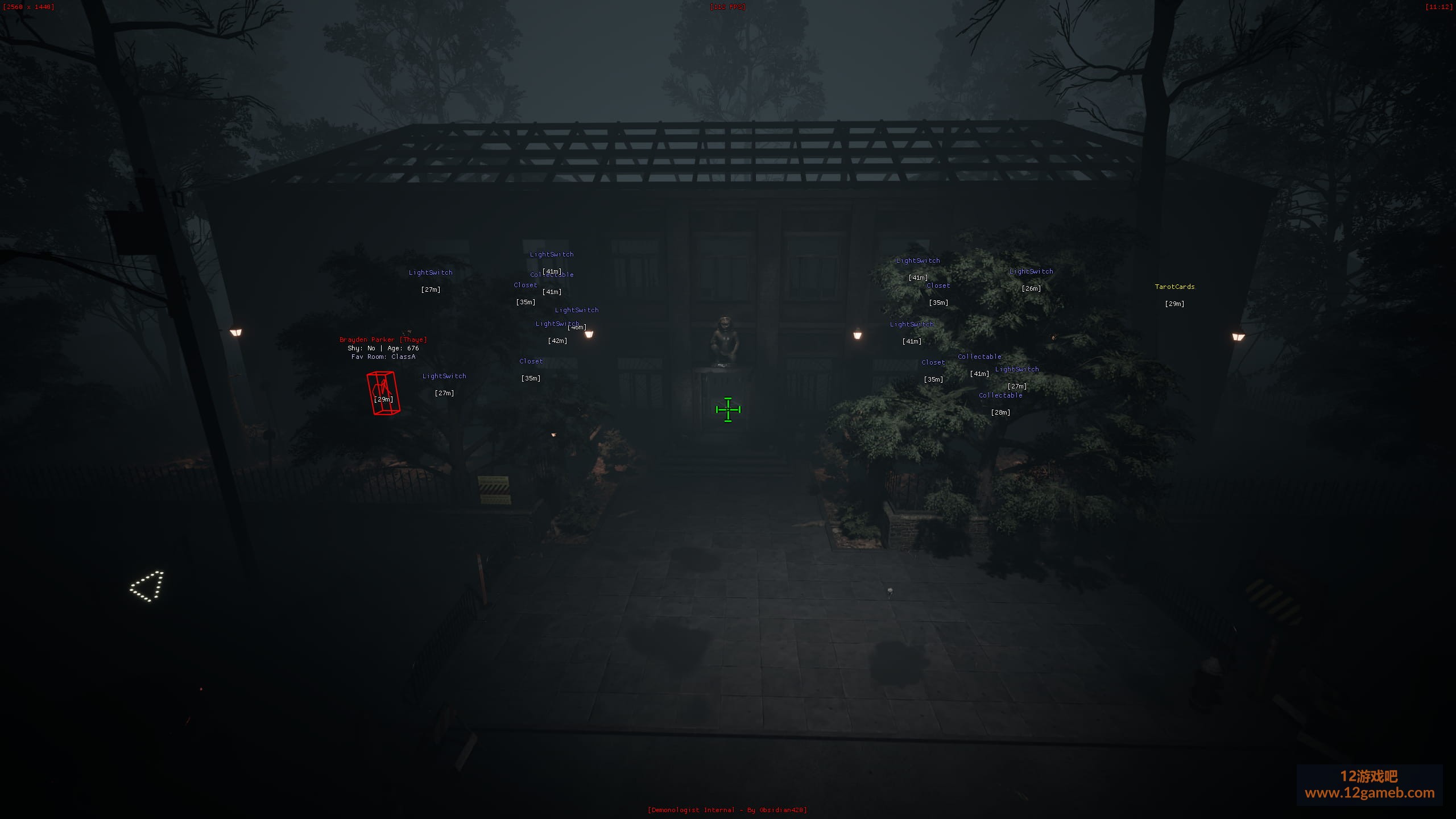
宠物 ESP(Pets ESP):
名称、距离(Name, Distance)
连线(Line),起点位于顶部 / 中心 / 底部(Top / Center / Bottom origin)
边界框(Bounding Box):无 / 2D / 3D / 四角 / 方块人(None / 2D / 3D / Corner / Box Man),可调框体大小(Box Size)
骨骼(Skeleton),可调渲染距离与粗细(render distance and thickness)
头部圆点(Head Dot),可调大小(size)
最大距离与最小距离(Max Distance and Min Distance)
颜色(Color)
玩家 ESP(Players ESP):
名称、距离(Name, Distance)
连线(Line),起点位于顶部 / 中心 / 底部(Top / Center / Bottom origin)
瞄准激光(Aim Laser),可调长度与粗细(length and thickness)
边界框(Bounding Box):无 / 2D / 3D / 四角 / 方块人(None / 2D / 3D / Corner / Box Man),可调框体大小(Box Size)
骨骼(Skeleton),可调渲染距离与粗细(render distance and thickness)
头部圆点(Head Dot),可调大小(size)
理智值(Sanity,在每个玩家的框旁显示其理智值)
最大距离与最小距离(Max Distance and Min Distance)
颜色(Color)
幽灵 ESP(Ghost ESP):
名称、距离(Name, Distance)
连线(Line),起点位于顶部 / 中心 / 底部(Top / Center / Bottom origin)
瞄准激光(Aim Laser),可调长度与粗细(length and thickness)
边界框(Bounding Box):无 / 2D / 3D / 四角 / 方块人(None / 2D / 3D / Corner / Box Man)——贴合幽灵骨骼(fitted to the ghost's skeleton),无论它呈什么形状
骨骼(Skeleton),可调渲染距离与粗细(render distance and thickness)
头部圆点(Head Dot),可调大小(size)
常驻房间(Favorite Room)
状态 / 事件(Status / Event)——幽灵当前正在做什么及其当前幽灵事件(current ghost event),均使用游戏内官方名称
猎杀信息(Hunt Info)——HUNTING 状态、是否锁定某位玩家(focused on a player)、猎杀是否被禁用(hunts disabled)、以及触发猎杀的理智阈值(the sanity level it hunts at)
统计数据(Stats)——年龄、已猎杀次数、互动次数、投掷物品数、是否怕生(age, hunts so far, interactions, items thrown, shy)
证据窗口(Evidence Window)——一个小窗口,列出该幽灵会留下的证据(the evidence this ghost leaves),若它能伪造证据则给出警告(warning if it can fake one)——即使关闭 Ghost ESP 也能工作
最大距离与最小距离(Max Distance and Min Distance)
颜色(Color)
方块人(Box Man) 会在每一根骨骼(bone)上绘制一个 3D 方块,尺寸随骨骼大小变化并随姿态弯曲(sized to the bone and bending with the pose),把每个角色变成方块人偶。骨骼数据直接读取各自模型自身的骨骼结构(each model's own bone structure),因此对玩家、宠物和幽灵同样有效。
道具 ESP(Tools ESP):
名称、距离(Name, Distance)
最大距离与最小距离(Max Distance and Min Distance)
颜色(Color)
世界 ESP(World ESP):
外质、电灯开关、幽灵球、保险丝盒、球、收藏品、幽灵绑定物品、拼图碎片、驱魔时钟和收音机(Ectoplasm, light switches, ghost orbs, the fuse box, balls, collectibles, ghost bound items, puzzle pieces, the exorcism clock and the radio)
名称、距离(Name, Distance)
最大距离与最小距离(Max Distance and Min Distance)
颜色(Color)
目标任务 ESP(Objectives ESP):
目标画作与十字架、找出正确时间、闹鬼区域、指纹、外质剪影、通灵板、巫毒娃娃、老鼠、血袋、五芒星、笔记本、笔记本电脑、武士刀及其放置点、保险丝、手术刀、磁带、喷雾、玩具铁轨碎片、武器零件与留声机零件(Objective paintings and crucifixes, Find the Correct Time, haunted areas, fingerprints, ecto silhouettes, the Ouija board, voodoo doll, rats, blood bags, pentagram, notebook, laptop, katana and its place, fuses, scalpels, tapes, spray, toy rail pieces, weapon parts and gramophone parts)
名称、距离(Name, Distance)
最大距离与最小距离(Max Distance and Min Distance)
颜色(Color)
调试对象 ESP(Debug Actor ESP):
关卡中的每一个 actor(Every actor in the level),含名称、距离、连线和边界框(Name, Distance, Line, and Bounding Box)
最大距离与最小距离(Max Distance and Min Distance)
颜色(Color)
ESP 设置(ESP Settings):
理智显示样式(Sanity Style):进度条 / 百分比 / 数值(Bar / Percentage / Value)
理智显示位置(Sanity Position):左 / 右 / 上 / 下(Left / Right / Above / Below)
理智条宽度(Sanity Bar Width)
2D 雷达(2D Radar)
显示雷达(Show Radar)
显示十字准星(Show Cross)
显示窗口(Show Window)
显示玩家标记(Show Player Marker)
显示视野范围(Show FOV),尺寸对应你的相机视场角(sized to your camera's field of view)
滚轮缩放(Scroll to Zoom):鼠标滚轮悬停在雷达上,仅限菜单打开时(mouse wheel over the radar, menu open only)
固定到屏幕中心(Pin to Screen Center)
拖动移动,拖拽边角调整大小(Drag to move, drag the corner to resize)
背景填充(Background Fill)
背景网格(Background Grid):锚定世界坐标的网格,会随你滑动、随视角转动,并带以米为单位的距离环(a world-anchored grid that slides and turns under you, with range rings in meters),可调网格间距(Grid Spacing)与颜色
罗盘(Compass):边缘显示 N / E / S / W,实时随视角转动(on the rim, turning with your view in real time)
形状(Shape):方形 / 圆形(Square / Circular)
雷达缩放(Radar Scale):5 至 500 米(5 to 500 meters)
窗口大小(Window Size)
十字准星大小(Cross Size)
最大距离(Max Distance)
标记大小(Marker Size)
标记形状(Marker Shape):三角形 / 圆点(Triangle / Dot)——三角形指向各接触目标的面朝方向(triangles point the way each contact faces)
超出范围时(Out of Range):隐藏 / 钉在边缘 / 任意位置绘制(Hide / Pin to Rim / Draw Anywhere)
堆叠距离与堆叠数量(Stack Distance and Stack Count):邻近的接触目标合并为一个标记并带计数(nearby contacts merge into one marker with a count)
雷达 X / Y 位置(Radar X / Y position)
接触目标(Contacts): 幽灵、玩家、宠物、道具(Ghost, Players, Pets, Tools)
标记标签(Marker labels):
绘制名称(Draw Name)
绘制理智值(Draw Sanity)
绘制距离(Draw Distance)
颜色(Colors): 雷达背景、雷达窗口、雷达十字准星、玩家标记、FOV 锥形区(Radar Background, Radar Window, Radar Cross, Player Marker, FOV Cone)
Player(玩家)
手电筒(Flashlight):
手电筒增强(Flashlight Boost):1 倍至 50 倍亮度,即时生效(1x to 50x brightness, updates instantly)
手电筒颜色修改(Flashlight Color Changer)
移动(Movement):
穿墙 / 飞行(No-Clip / Fly):可自定义绑定按键,可调速度(custom bindable key, adjustable speed)
超级速度(Super Speed):1 倍至 10 倍——行走与冲刺均生效(1x to 10x - works with walking and sprinting)
位置与传送(Position and Teleport):
打印位置(Print Position):实时 X / Y / Z 数值显示(live X / Y / Z readout)
保存当前位置(Save Current Position):可命名并存储任意地点(name and store any location)
每个已保存地点对应一个传送按钮(Teleport buttons for every saved location)
删除已保存地点(Delete saved locations)
属性(Stats):
无限体力(Infinite Stamina)
无限理智(Infinite Sanity)
上帝模式(God Mode)
经济(Economy):
设置金钱(Set Money)
设置经验(Set Experience)
设置等级(Set Level):精确设定你的等级(sets your level exactly)
道具与灯光(Tools and Lights):
无限道具(Unlimited Tools):十字架永不消耗;罪恶币投掷、塔罗牌与符箓的燃烧时间永不耗尽(the Crucifix is never used up; Sin Coin tosses, Tarot Cards and Fulu burn time never run out)
灯光不损坏(Lights Don't Break):使用游戏自带的“灯光不损坏”选项——即使拨动开关,灯也不会坏(uses the game's own "Lights Won't Break" option - lights never break, even when flicking switches)
幽灵操控(Ghost Manipulation,仅限主机 / 单人 host / solo only):
开始猎杀(Start Hunt)
结束猎杀(End Hunt)
显示幽灵(Show Ghost)
触发事件(Trigger Event):按游戏内官方名称选择任意幽灵事件(pick any ghost event by its in-game name)
Misc(杂项)
准星(Crosshair):
启用(Enable)
20 种准星样式(20 crosshair types):圆点(Dot)、十字(Cross)、X、圆圈(Circle)、T 形(T-Shape)、方形(Square)、菱形(Diamond)、实心方形(Square Filled)、短横(Dash)、四角(Corners)、靶心(Target)、双圆(Double Circle)、米字(Asterisk)、折线箭头(Chevron)、奔驰标(Mercedes)、上箭头(Arrow Up)、外扩箭头(Arrows Out)、军用十字(Cross Military)、眼睛(Eye)、方括号(Brackets)
中心圆点(Center Dot)
使用描边(Use Outline)
大小(Size)
粗细(Thickness)
描边粗细(Outline Thickness)
颜色与描边颜色(Color and Outline Color)
视觉(Visuals):
显示水印(Show Watermark)
显示 FPS(Show FPS)
显示分辨率(Show Resolution)
显示时间(Show Time)
ESP 文字描边(ESP Text Outline)
玩家理智(Player Sanity):
绘制理智条(Draw Sanity Bar):你自己的理智——随下降由绿转琥珀再转红。菜单打开时可拖动重新定位
绘制理智百分比(Draw Sanity Percentage)
满理智时隐藏(Hide at Full Sanity)
理智条不透明度(Sanity Bar Opacity):10% 至 100%(10% to 100%)
热键(Hotkeys):
菜单开关(Menu Toggle,可重新绑定 rebindable)
卸载 DLL(Unload DLL,可重新绑定 rebindable)
开关 Ghost ESP(Toggle Ghost ESP)
开关 Tools ESP(Toggle Tools ESP)
开关雷达(Toggle Radar)
设置(Settings):
保存设置(Save Settings)
加载设置(Load Settings)
注入时自动加载已保存配置(Auto-loads your saved config on injection)
保存全部标签页内容,包括 Player 修改项、热键、雷达布局以及已保存的传送地点(Saves every tab, including Player mods, hotkeys, radar layout, and saved teleport locations)
注意事项(Notes)
幽灵操控仅在你作为主机或单人游玩时有效;幽灵的 AI 在主机端运行
设置保存于 Documents\Demonologist_Internal_Settings.bin(Settings are saved to ...)。
12游戏吧 » Demonologist《恶魔学家》透视穿墙无限体力免费辅助【DX12】
